Greenstar Technology Service Network

What we would do first

    What changes

      For New York startups and research groups

      Turn the notebook into a job that runs every night

      Today the notebook runs on someone's laptop when they remember, and nobody hears when it stops. We move its code to a server in your own cloud account and run it on a schedule. Postgres refuses bad rows. Every table shows how old its data is. A person answers every alert.

      ingest hostspecimen
      $ crontab -l | grep -B1 permits
      # owner: dana (data team) · pages: on-call
      0 2 * * *  run permits-sync
      $ tail -n 5 /var/log/jobs/permits-sync.log
      Oct 16 02:00:01 start source: public feed
      Oct 16 02:03:47 fetch complete
      Oct 16 02:11:20 load  complete · checks pass
      Oct 16 02:14:05 freshness clock reset
      Oct 16 02:14:06 done  exit 0 · heartbeat sent
      $ 

      What runs at night

      Your first pipeline has four parts

      The job logs every run. Postgres holds bad rows for review. The web server logs every request. A watcher pages a person. Each card shows a normal night and the night the 02:00 run did not start.

      Specimen · a nightly public-data pipeline for a small team · October 16, 2026

      1Ingest on time02:00 missed

      The 2 AM pull and its run log

      Jobs pull from public feeds, partner files, instruments and your own databases on a schedule. Each run logs when it started, when it finished and whether it completed. Each dataset has a clock that shows how old it is.

      Run log

      job
      permits-sync · owner: Dana, data team
      schedule
      0 2 * * * · daily at 02:00
      started
      Oct 16 02:00:01
      finished
      Oct 16 02:14:06
      result
      complete · checks pass
      freshness
      6 h 02 m · limit 26 h

      The night the 02:00 run did not start

      schedule
      0 2 * * * · daily at 02:00
      expected
      Oct 7 02:00
      result
      did not start
      why
      host restarted at 23:41; the container did not come back
      freshness
      24 h 15 m at 02:29 · run overdue · limit 26 h
      2Store consistentheld

      Postgres turns away bad rows

      Data lands in Postgres with a schema, keys and constraints. A malformed row is refused on the way in and never reaches a chart. Each load is one transaction, so a failed run writes nothing partial.

      Tables and a rule

      permits
      loaded Oct 16 02:11
      inspections
      loaded Oct 16 02:11
      sources
      reference · changed by review
      rule
      CHECK (issued_on <= current_date)
      caught
      Oct 14 02:11 · refused issued_on 2062-01-09, a two-digit year read as 2062; that row held for review, the rest committed

      While the run is missing

      permits
      last complete load Oct 6 02:11
      since
      no writes · nothing partial
      state
      yesterday's complete data, intact
      3Serve serving02:34 banner on

      Static pages and a read-only API behind nginx

      Results go out as a site, a download or an API that your app or collaborators call. Pages are static where they can be. The API only reads from the database. Every response says how old its data is.

      nginx · request log

      1. GET /2004 ms
      2. GET /api/permits20011 ms · age 6h02m
      3. GET /data/permits.csv20038 ms

      The late banner

      1. GET /api/permits200age 24h22m · late
      2. GET /200banner: late
      4Observe watching02:34 paged

      The watcher pages a named person

      Jobs send heartbeats. Datasets carry freshness clocks. A missed run pages someone within minutes.

      Heartbeat and rules

      watching
      permits-sync heartbeat
      last beat
      Oct 16 02:14:06 · on time
      rule
      no heartbeat by 02:20 → page on-call
      rule
      freshness past 24 h 15 m for 5 min → page on-call, put the late banner on the site
      on call
      a named person, this week

      What the watcher did

      02:29
      run overdue · data 24 h 15 m old, limit 26 h
      02:34
      rule fired · paged on-call · late banner on
      02:41
      acknowledged by a person
      03:37
      container restarted, run complete · banner off

      On Oct 7 the 02:00 run never started (INC-14 below). Nothing partial was written. A person was paged at 02:34 and answered at 02:41. The site showed a late banner until the run completed at 03:37.

      Quiet failures

      Nothing errors when a job stops

      A job stops. A date filter matches nothing. A mirror keeps serving its last copy. We make each of these page someone.

      • When a job misses its heartbeat, someone gets paged
      • Zero new rows on a day that always has them counts as a failure
      • A date that won't parse is refused when the data arrives
      • Mirrors, pages and API responses all show how old their data is
      • After each deploy we test the routes that matter from outside
      • Each alert goes to a named person who acknowledges it
      incidents.logspecimen
      1. INC-14Oct 7detected after 34 min

        cause
        The host restarted for updates. The container runtime was not set to start at boot, so the 02:00 job never ran.
        caught by
        the freshness rule, which paged on-call at 02:34
        changed
        The runtime starts at boot, and a job with no heartbeat by 02:20 now pages on its own.
      2. INC-11Sep 20detected after 12 min

        cause
        A redeploy dropped the route behind the CSV download. The site still loaded, so nothing looked wrong from inside.
        caught by
        the outside check that downloads the CSV every 15 minutes
        changed
        A deploy now checks every listed route before it finishes, so a dropped route fails the deploy instead of the download.
      3. INC-07Sep 5detected after 1 h 10 min

        cause
        A mirror's sync worker did not start after a configuration change. The mirror kept serving its last copy and looked current.
        caught by
        the mirror's newest-row clock, which stopped moving and crossed its limit
        changed
        Every deploy checks that the worker is running, and the mirror's page shows the date of its newest upstream row.

      Starting points

      Pick the one that sounds like your team

      Six common starting points. Under each is the work we do first, agreed in writing before we begin.

      Hosting

      One laptop runs everything

      The scraper, the database and the Monday report live on one person's machine. Close the lid and the work stops. Nobody hears about it.

      What we do first

      • An inventory of every scheduled job on it and what reads its output
      • The jobs moved to a small server in your own cloud account
      • A freshness clock and an alert to a named person

      Ownership

      The cron job nobody owns

      Someone set it up before they left. It probably still runs. Nobody is sure what reads its output or what breaks if it stops.

      What we do first

      • Each scheduled job and where its output goes
      • An owner named for each, or a written decision to retire it
      • A heartbeat on each that pages someone when a run is missed

      Grants

      A grant deliverable is due with nobody to build it

      The proposal promised a portal, a public dataset or an API. The funding has started. The person who would build it is writing papers.

      What we do first

      • The deliverable read as the funder wrote it, mapped to the reporting dates
      • A written plan the principal investigator or founder signs
      • The repository, hosting account and first pipeline in your organization's name

      Big files

      A dataset too big for a spreadsheet or a notebook

      The file no longer opens. The notebook runs out of memory. Every analysis starts with a fresh download.

      What we do first

      • Loaded once into Postgres with a schema and constraints
      • A scheduled job that adds only what is new
      • The notebook's charts drawn from the database

      Product

      The demo became the product

      Real users now depend on it. It deploys from a branch and has no tested backup. Nobody is paged when it goes down.

      What we do first

      • Backups and a tested restore
      • One deploy path from the main branch
      • Uptime and error alerts that reach a person

      Instruments

      Instrument files in someone's Downloads folder

      The instrument writes files to the PC beside it. Someone copies them to the shared drive when they remember.

      What we do first

      • A watcher on the instrument's export folder
      • Files copied, checksummed and logged as they appear
      • An alert when the instrument goes quiet during hours it should be running

      How a project runs

      We set the handover date before we build

      Each of the five steps leaves something your team keeps: an inventory, a plan, a running system, an incident write-up, a runbook. The specimen below is a small team whose nightly public-data job ran on a laptop. Partners download its results weekly.

      Discovery · what runs where1 / 5
      Step 1 · Discovery · week 1inventory · what runs where

      Everything that runs and who owns it

      Nightly pull
      A cron entry on one laptop. Runs when the lid is open. No owner named.
      Database
      A SQLite file in a shared drive. No backup, no schema beyond the code that writes it.
      Dashboard
      A notebook, re-run by hand on Monday mornings.
      Credentials
      An API key pasted into a notebook cell.
      Alerts
      None. Problems surface when a chart looks wrong.
      Users
      Partner labs download the CSV each week.

      Nothing changes in week one. The week ends with this list, agreed by your team.

      Step 2 · Design · week 2plan · signed before we build

      Keep the parsing code and replace the laptop cron

      Keep
      The parsing code, the notebook's charts, and the CSV the partners already use.
      Replace
      The laptop cron, with a scheduled job on a small server in your cloud account. SQLite, with Postgres.
      Add
      A freshness clock on every table, two alert rules, and a line on the dashboard saying how old the data is.
      Owners
      One named person on your team per job. Greenstar on call until the handover.
      Not doing
      Kubernetes, a data warehouse, or anything that needs a platform team to keep alive.
      Handover
      Week 8, written into the plan now.

      Your team signs the plan. If the plan changes, the document changes first.

      Step 3 · Build · weeks 3 to 6freshness · hours since the last complete load

      The freshness clock now resets every night

      72 h48 h24 h0 h MonSatMonSat laptop shut Friday to Monday before · one laptop after · scheduled job limit 26 h

      Before was rebuilt from the output files' timestamps, since nothing logged the runs. The long climb is the laptop shut from Friday to Monday. After, the job runs on a server in your account and stays under the 26-hour limit the site promises.

      Step 4 · Run · from week 6incident · closed

      Caught by a rule before anyone saw a chart

      Paged
      02:31 on a Tuesday in week 7: a weekday run loaded nothing new.
      Answered
      02:38, by the engineer on call.
      Cause
      The source began sending its date column as text in a new format. The date filter matched nothing, and the job would otherwise have reported success.
      Fixed
      The new date format added to the parser; the missing day loaded by 03:20.
      Changed
      Dates are now parsed when the data arrives, and text that does not parse is refused, not filtered to nothing.

      Your team read about it in the morning summary. The partners' download never showed a gap.

      Step 5 · Handover · week 8runbook · owners · access

      Your team runs it from the runbook

      Runbook
      One page per job: what it does, how to rerun it, what each alert means and who answers it.
      Owners
      Every job and every alert names a person on your team.
      Access
      Every account and credential is in your name. Our access is removed on the date you choose.
      Map
      What runs where, kept as text in your repository next to the code.
      After
      Keep us on call, or keep the runbook and call us when you want help.

      Handover is a deliverable with a date, written into the plan in week 2.

      A two-person startup gets the same five steps as a lab. Only the sources and the deliverable change.

      For research groups

      Pipelines that outlive the student or postdoc

      A university's research-computing group runs the shared machines and helps people use them: accounts, allocations, storage, office hours. A lab's own pipelines, built for one project and kept running for years, usually fall to whoever has time. We take them on for university labs and independent research groups.

      What we build for a lab

      NIH and NSF require a data plan

      NIH's Data Management and Sharing Policy and NSF's proposal rules both require a written plan for the data a project produces. We build the system that carries it out.

      • Scheduled pipelines from an instrument, a public source or a partner's feed into a database, logging every run
      • Long-running watchers on an export folder, a sensor network or a public record that alert when the source goes quiet
      • A public dataset, an API or a download site that shows when it was last updated
      • Document and OCR pipelines that turn scanned forms and archives into tables you can query
      • The data management and sharing plan carried out: where the data lives, what is shared, when, and for how long
      • Documentation and a handover as named deliverables

      What we leave alone

      Your cluster stays with research computing

      Jobs that need the cluster keep running there. We build what feeds those jobs and what happens to their results.

      • HPC allocations and cluster time
      • Cluster, scheduler and shared-storage administration
      • University accounts, software licenses and storage quotas
      • IRB, data-use and export determinations; we build to the terms your institution sets
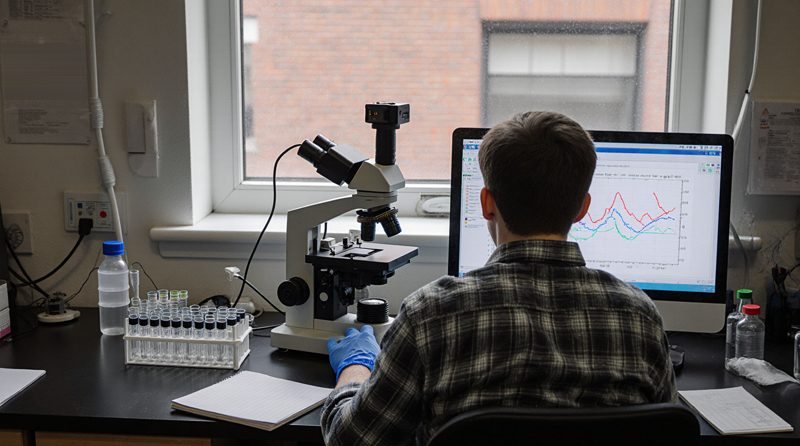
      A researcher in a plaid shirt and blue gloves at a lab bench, his back to the camera, a microscope with a camera mounted on top beside a monitor plotting colored traces, a rack of tubes and a window onto a brick building
      Bench data starts as files on the computer beside the instrument. Our pipelines pick them up there.

      Grants and contracts

      We build the pipeline a grant pays for

      A grant or a contract often pays for something that has to keep running: a dataset to publish, a portal to keep up, reports on a schedule. We build and run it in your name and keep the run logs a progress report asks for.

      Federal research programs

      SBIR and STTR

      Both fund small companies' research in phases, through NIH, NSF, DOE, DOD and other agencies. STTR pairs the company with a research institution, often a university lab. We build the data systems Phase I needs to show feasibility and Phase II carries forward. We work as a subcontractor within each program's rules on the company's own share of the work.

      • An infrastructure plan the proposal can describe accurately
      • Pipelines, storage and monitoring in the company's own accounts
      • Run logs and uptime for the progress reports

      Foundation and agency grants

      Each data release goes out on schedule

      Many grants now ask for the data along with the findings: a repository deposit, a public dataset, a portal or an API. We build the pipeline that produces it on schedule. We write the documentation the final report points to.

      • Deposits to the repository your plan names
      • A public dataset or site that shows its last update
      • A written log of how each release was produced

      City and state

      City technology bids the day they post

      New York City posts procurement notices in the City Record and runs solicitations through PASSPort. We read the notices every day and flag technology solicitations for software or data work. Where M/WBE certification applies, from the City's Department of Small Business Services or Empire State Development, we track its status and the participation goals in your categories.

      • Open city bids for software and data work
      • The insurance, references and certification each bid requires
      • M/WBE certification status and the participation goals that apply

      How it starts

      Send us a project

      1. Your note. What runs today and on what, what keeps breaking, and what is due. We reply within one business day and set up a call if that is faster.
      2. A written scope. What we would build and keep, who owns each piece, and the handover date.
      3. Build and run. In your accounts, monitored from day one. We stay on call or hand it over.

      Or email [email protected]